


How automatic tracking works
GPS tracking is what makes Bounded automatic: once it is on, the app logs which country you are in every day — in the background, without you opening it. Cross a border and Bounded notices; your counters update on their own.
Turning it on
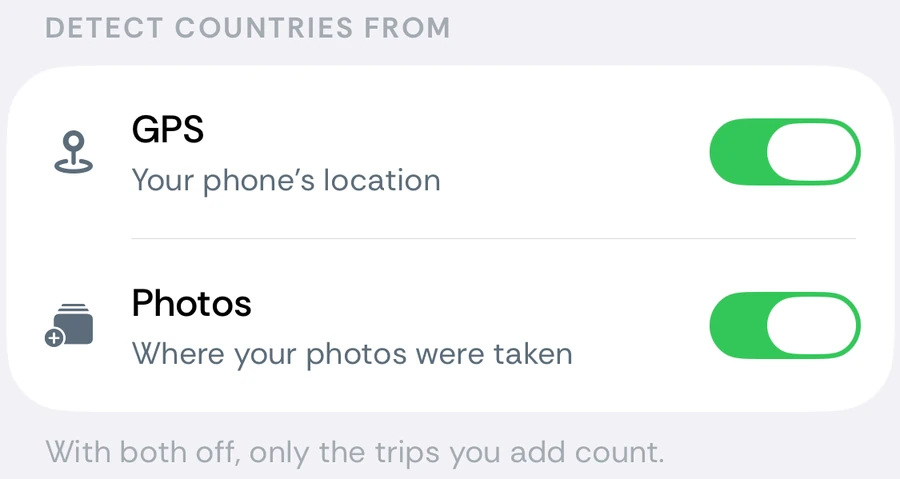
Bounded can detect countries from two sources, each with its own switch under You → Settings → Detect countries from (Settings opens from the gear on the You tab):
- GPS — your phone’s location. It needs iOS location access set to Always, which is what allows detection while the app is closed. Until it is, the row reads Needs “Always” location access, and turning it on takes you to iOS Settings.
- Photos — where your photos were taken, from the GPS tags your camera adds. It fills in the past through the photo scan and keeps adding days from new photos.
Both are on by default. With both off, only the trips you add count.
How detection works
Bounded does not run continuous GPS. It uses two low-power iOS mechanisms — significant location changes and visit monitoring — which wake the app briefly when you move a meaningful distance or settle somewhere new. Each update is resolved to a country (and, inside the US, a state and city) on your device and stored as part of that day’s record.
- Battery friendly — no constant GPS; the impact on battery life is minimal.
- On-device — your coordinates are resolved locally. Nothing is sent to a server; see how Bounded handles your data.
- Day-level — Bounded stores which country each day belongs to, not a movement trail.
- GPS outranks photos — a photo cannot put you somewhere your phone was not. If GPS has you in the same country on both sides of a photo’s day, up to about a week apart, a photo tagged elsewhere (say, one a friend shared) does not add that country. See how sources are ranked.
Days in more than one country
If you cross a border mid-day, that date becomes a transition day — it can count in both countries, which is how most visa and tax rules treat arrival and departure days. Your History calendar shows exactly which countries each day counted toward.
Turning GPS off
Switch GPS off and Bounded stops logging your location — you can keep the timeline going with manual trips instead. The days while it is off are not filled in from the last country GPS saw, so a trip taken in that time never counts as a stay at home. Turning GPS back on resumes from that point; it does not backfill the days it missed, so fill those by hand or re-run the photo scan.
Turning Photos off
Switch Photos off and new photos stop adding days. If photos already added days to your calendar, Bounded asks Stop using photos? — Keep days leaves them as they are, Remove deletes only the days that came from photos and counts just GPS and the trips you add. Manual, imported and GPS days are never touched. Turning Photos back on, or running You → Your data → Re-sync from photos, scans your library again and fills the photo days back in.
Related articles
Can’t find what you’re looking for? We answer every message.
Contact support